Blogger Widgets
Showing posts with label Blogger Tricks. Show all posts

Tuesday, November 6, 2012

Attractive Matte CSS Menu Menu Bar For Blogger

This is a nice CSS menu-bar with colors. There have 4 colors, for choose.Im included a demo for this menu bar, you can check it from demo link.

1. Go on your blog EDIT HTML option.
2. Find this tag by using Ctrl+F  ]]></b:skin>
3. Paste below code Before ]]></b:skin> tag.

/* The CSS Code for the menu starts here */
   #menu12 {
    font-family: Arial, sans-serif;
    font-weight: bold;
    text-transform: uppercase;
    margin: 50px 0;
    padding: 0;
    list-style-type: none;
    background-color: #eee;
    font-size: 13px;
    height: 40px;
    border-top: 2px solid #eee;
    border-bottom: 2px solid #ccc;
   }
   #menu12 li {
    float: left;
    margin: 0;    
   }
   #menu12 li a {
    text-decoration: none;
    display: block;
    padding: 0 20px;
    line-height: 40px;
    color: #666;
   }
   #menu12 li a:hover, #menu li.active a {
    background-color: #f5f5f5;
    border-bottom: 2px solid #DDD;
    color: #999;
   }
   #menu12_wrapper ul {margin-left: 12px;}
   #menu12_wrapper {padding: 0 16px 0 0; background: url(https://blogger.googleusercontent.com/img/b/R29vZ2xl/AVvXsEiX_rn24lmIca_yO_4Kmq7gxIJMAYEKcIy_JeaLvjoLKAsb8RENY3N1c0x6DFQ6c4668-4S9hdowu7qfMP7iFfgYO_gmeWfAc-VPKQahHLkKl6stYQ9InbC-3Mt0dD3cGj4AS2gMOdFnSA/s1600/grey.png) no-repeat right;}
   #menu12_wrapper div {float: left; height: 44px; width: 12px; background: url(https://blogger.googleusercontent.com/img/b/R29vZ2xl/AVvXsEiX_rn24lmIca_yO_4Kmq7gxIJMAYEKcIy_JeaLvjoLKAsb8RENY3N1c0x6DFQ6c4668-4S9hdowu7qfMP7iFfgYO_gmeWfAc-VPKQahHLkKl6stYQ9InbC-3Mt0dD3cGj4AS2gMOdFnSA/s1600/grey.png) no-repeat left;}
   
   /* Black Menu */
   #menu12_wrapper.black ul {
    border-top: 2px solid #333;
    border-bottom: 2px solid #000;
    background: #333;}
   #menu12_wrapper.black a {color: #CCC;}
   #menu12_wrapper.black li a:hover, #menu_wrapper.black li.active a {color: #999; background: #555; border-bottom: 2px solid #444;}
   #menu12_wrapper.black {background: url(https://blogger.googleusercontent.com/img/b/R29vZ2xl/AVvXsEhZ_GnLAiSb7aSFyKdc21eEjRdP3NmVP6D6i-YpQr4P40DKlBj6Giu4AhONTsYruhMc1nTypHsb17W3U5gPSxkMpuW6RZ3l2oK-0zsJ4iog4ZQqqbJ-bFtGGWUmvoSPaCAik_z0pVOXygo/s1600/black.png) no-repeat right;}
   #menu12_wrapper.black div {background: url(https://blogger.googleusercontent.com/img/b/R29vZ2xl/AVvXsEhZ_GnLAiSb7aSFyKdc21eEjRdP3NmVP6D6i-YpQr4P40DKlBj6Giu4AhONTsYruhMc1nTypHsb17W3U5gPSxkMpuW6RZ3l2oK-0zsJ4iog4ZQqqbJ-bFtGGWUmvoSPaCAik_z0pVOXygo/s1600/black.png) no-repeat left;}
   
   /* Blue Menu */
   #menu12_wrapper.blue ul {
    border-top: 2px solid #356AA0;
    border-bottom: 2px solid #204061;
    background: #356AA0;}
   #menu12_wrapper.blue a {color: #fff;}
   #menu12_wrapper.blue li a:hover, #menu_wrapper.blue li.active a {color: #90CDFF; background: #3D7BBB; border-bottom: 2px solid #356AA0;}
   #menu12_wrapper.blue {background: url(https://blogger.googleusercontent.com/img/b/R29vZ2xl/AVvXsEjbKWsA7TablAWM3NAp_afmNLWHpq2Ms04UnKi6j5XdS_4DflznohVDVrdH5BSMBjz00e35bvRHueru-XBotJEoaMSTKFaaRCvBFMiVxEI5DseQ5pKrP_Qgkrc2I8jDKOv_xoZqLLfX7XU/s1600/blue.png) no-repeat right;}
   #menu12_wrapper.blue div {background: url(https://blogger.googleusercontent.com/img/b/R29vZ2xl/AVvXsEjbKWsA7TablAWM3NAp_afmNLWHpq2Ms04UnKi6j5XdS_4DflznohVDVrdH5BSMBjz00e35bvRHueru-XBotJEoaMSTKFaaRCvBFMiVxEI5DseQ5pKrP_Qgkrc2I8jDKOv_xoZqLLfX7XU/s1600/blue.png) no-repeat left;}
   
   /* Red Menu */
   #menu12_wrapper.red ul {
    border-top: 2px solid #660000;
    border-bottom: 2px solid #450000;
    background: #660000;}
   #menu12_wrapper.red a {color: #fff;}
   #menu12_wrapper.red li a:hover, #menu_wrapper.red li.active a {color: #F27F84; background: #990000; border-bottom: 2px solid #660000;}
   #menu12_wrapper.red {background: url(https://blogger.googleusercontent.com/img/b/R29vZ2xl/AVvXsEhd5VjkmG3CQTs8m7c48LLYWFHc73ttD7lO_df88WP93XJ26UHFjJliF0Os_S7a58S6HqGvwUe9SlMdO8e7GdryAxwDQtb1YMeUuRCHsUceHfgKsWGNOv1WtcwULMt780cQA7DVHm32Q6Y/s1600/red.png) no-repeat right;}
   #menu12_wrapper.red div {background: url(https://blogger.googleusercontent.com/img/b/R29vZ2xl/AVvXsEhd5VjkmG3CQTs8m7c48LLYWFHc73ttD7lO_df88WP93XJ26UHFjJliF0Os_S7a58S6HqGvwUe9SlMdO8e7GdryAxwDQtb1YMeUuRCHsUceHfgKsWGNOv1WtcwULMt780cQA7DVHm32Q6Y/s1600/red.png) no-repeat left;}
   

4. Go to blogger Layout and add a HTML/Javascript gadget.
5. Paste below code in it.

 <!-- Grey Menu -->
  <div id="menu12_wrapper" class="grey">
   <div class="left"></div>
   <ul id="menu12">
    <li><a href="#">Home</a></li>
    <li class="active"><a href="#">About</a></li>
    <li><a href="#">Services</a></li>
    <li><a href="#">Products</a></li>
    <li><a href="#">Contact</a></li>
    <li><a href="http://www.bloggertrix.com/">Add This</a></li>
   </ul>
  </div>

6. To change the style, you have to replace <div id="menu12_wrapper" class="grey"> with below styles

   <div id="menu12_wrapper" class="black">

   <div id="menu12_wrapper" class="blue">

   <div id="menu12_wrapper" class="red">

 <div id="menu12_wrapper" class="grey">

7. Now save your HTML/Javascript'.
    You are done...

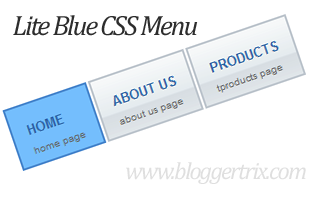
Stylish Lite Blue CSS Menu Bar For Blogger

This post is also about CSS menu bar, It Includes with nice lite blue hover color. Iam using CSS and HTML for this menu.
You can add this easily.Check below for
demo.you can get similar menu bar from
here.


Lite+Blue+CSS+Menu


  1. 1. Go to your blog's Edit HTML option.
  2. Find this code  by using Ctrl+F  ]]></b:skin>
  3. Paste below code Before ]]></b:skin> code.

/* Koooltrix.blogspot.com  */
#menu2{
    width:90%;
    margin:25px auto;
}
#menu2 ul{
    list-style:none;
}
#menu2 li{
    display:block;
    float:left;
}
#menu2 li a{
    background:#e4e8eb url(https://blogger.googleusercontent.com/img/b/R29vZ2xl/AVvXsEgOPM6M7c32u1obAbD6eX5lHofp50S9d-J8fM04mq_T0rprSIy2rmcvlzpC1FQFLbcio88tUN3-ZW9NyonrQwNaySSUjck5CXYOXUqhWAgFlbHNDOZ05VDkul9L4fF8f77Xj6veOghvess/s1600/menu_bg.gif) repeat-x;
    border:2px solid #bdc5cd;
    margin:0 1px;
    padding:15px 15px 15px 15px;
    display:block;
    float:left;
    color:#2b61a1;
    text-transform:uppercase;
    text-decoration:none;
    font-family:Geneva, Arial, Helvetica, sans-serif;
    font-size:13px;
    font-weight:bold;
    height: 30px;
}
#menu2 li a span{
    color:#636363;
    font-size:10px;
    text-transform:lowercase;
    font-family:Geneva, Arial, Helvetica, sans-serif;
    font-weight:normal;
}
#menu2 li a:hover{
    background:#e46825 url(https://blogger.googleusercontent.com/img/b/R29vZ2xl/AVvXsEiffhK1VOLD_eBOSIA6uBHh5bFloMF_32xBzBR8G1a2365nOd7omp2rFjSoqQuUw3XiaKlkN9Ktgar0JORS2eS7-7VzS9c5FuMP1f-uzyuzdfyeBJyNKgwqCHtB8bXVagPgiRGOwZ4f0Ek/s1600/menu_hover.gif) repeat-x;
    border:2px solid #4a88ce;
    text-decoration:none;
}
#menu2 li a:hover span{
    color:#636363;

}
.current{
    background:#74befd url(images/menu_hover.gif) repeat-x;
    border:2px solid #4a88ce;
    margin:0 1px;
    padding:15px 15px 15px 15px;
    display:block;
    float:left;
    color:#2b61a1;
    text-transform:uppercase;
    text-decoration:none;
    font-family:Geneva, Arial, Helvetica, sans-serif;
    font-size:13px;
    cursor:pointer;
    font-weight:bold;
    height: 30px;
}
.current span{
    color:#636363;
    font-size:10px;
    text-transform:lowercase;
    font-family:Geneva, Arial, Helvetica, sans-serif;
    font-weight:normal;
}
  1. Go to Layout option.
  2. Add 'HTML/Javascript" gadget.
  3. Paste below code in it.

<div id="menu2">
<ul>
<li class="current">Home<br />home page</li>
<li><a href="#">About Us<br />about us page</a></li>
<li><a href="#">Products<br />products page</a></li>
<li><a href="#">Partners<br />partners page</a></li>
<li><a href="http://koooltrix.blogspot.com/">Contact Us<br />contact page</a></li>
</ul>
</div>
 *ReplaceURLs as your like.
Now save it and you have done...

Enjoy !!!

Three Essential Ways To Build Back Links For a Blog


It is a very common  phenomenon for each and every business  concern  of the  21 st century to maintain a website or  a blog of  its own where it can release all  essential information  relating to its  business.  As such, it  can  provide a very clear picture to the general public as well as the government   authorities  about  its functioning past and  present  performances  and the various benefits  which  it  can   avail  to  the  interested parties. Now, once a  website  or  blog  has been designed  and  launched  at    the    international sphere, it is necessary for the concerned entity to add links to them in order to expand its web page authority. Owever, this process of getting backlinks for a website or blog is not an easy phenomenon. Therefore, it is really important for a website or blog developer to follow the appropriate and convenient ways to get back links to the respective website or blog.


 Build Back Links For a Blog

Some such correct procedures to add links to a blog or website are as follows:-

1. Usage of Web Directories
Here, the concerned website or blog must be submitted to the
web directory services. By doing this, the company which is attempting to get back links for
its website or blog can give a clear indication to the people that its blog or website can be
accessed after finding the same from the web directory. Each and every update of the blog or
website must be submitted to the web directory, a process that must be completed within five
minutes if the content to be reported to the directory is not that huge.

2. Forum Posting
The concerned organization should post updates or participate in voicing
activities in any of the forums so that it can gain a good publicity or popularity amongst the
internet surfers. These forums, therefore, are of great help in getting back links for a blog or
website. But one thing that is to be kept in mind is that only such forums should be chosen
which offer ‘Do Follow Options’. There are many forums around which are not provided with
this particular option as they are barred by the administrators. Lastly, a genuine signature
should be submitted along with anchor text as keyword before posting status and updates in
the forum. One more thing that is to be looked into is that the companies posting comments or
updates should not get into spam.

3. Link Baiting
In link baiting, the company is getting the links to add to its blog or website from
other valid sources. Thus, the concerned company can be assured of getting only the required
links for its blog or website and no other unnecessary stuffs since the links are being supplied
by authentic and specialized sources. It is, however, not a very popular means of getting back
links to a website or a blog but at the same time, it can be a very systematic way of adding links
to websites and blogs only if it is applied in the right manner and hence, is still considered as an
essential way of adding back links to a company’s website or blog.

Osho Garg writes for www.opendoorloan.co.uk. He uses his technology skills to discover brilliant posts for theinstant loans site.
If you would like to write for bloggertrix, check our guest posting guidelines.


Enjoy !
To get latest updates, Subscribe here !!!


Get Latest Updates: Subscribe Now | Like Us On Facebook

X